




Easy GMC Key Fob Battery Change Guide
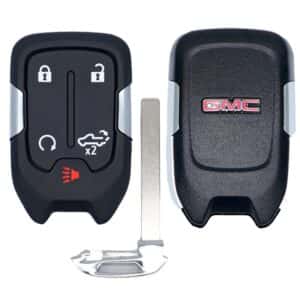
🛠️ DIY GMC Key Fob Battery Change: Easy Steps for Rochester Drivers
Is your GMC key fob starting to lose its range, or are you seeing that frustrating “Low Key Fob Battery” alert on your dashboard? Before you stress, know that replacing your GMC key fob battery is a simple, DIY auto maintenance task you can handle right at home in Rochester, NY!
At Vision Buick GMC, we believe in empowering our customers with the knowledge to perform quick fixes, saving you a trip to the service center for something minor. This guide walks you through the easy process of a GMC key fob battery replacement for most modern GMC models like the Sierra, Terrain, and Yukon.
Why DIY Your GMC Key Fob Battery?
A dead or dying GMC remote key is a big inconvenience, but a quick DIY battery change restores full function right away. Here’s why doing it yourself is a great option:
- Cost-Effective: A replacement battery (typically a CR2032 or CR2450 coin cell) costs just a few dollars.
- Time-Saving: The entire process takes less than five minutes.
- Empowering: Feel confident knowing you can handle this essential piece of GMC service without scheduling an appointment.
Essential Tools for Your DIY Key Fob Swap
You only need a few common items for this simple project:
- New Battery: Most modern GMC key fobs use a 3-volt CR2032 coin battery. However, some larger remotes, especially for recent truck models, may use a CR2450. Always check your owner’s manual or the old battery itself to confirm the correct battery type.
- Small Flathead Screwdriver or Coin: A small, non-metal tool is ideal, but a flathead screwdriver or even a small coin works for prying open the casing. A pro-tip: Many GMC key fobs are designed so the mechanical emergency key acts as the perfect prying tool!
Step-by-Step GMC Key Fob Battery Replacement
Follow these steps for a successful key fob battery change for your GMC vehicle:
- Remove the Emergency Key: Locate the small button or latch, usually near the key ring loop. Press and hold it while simultaneously sliding or pulling the hidden mechanical key out of the fob casing.
- Open the Fob Casing: Look at the slot where the emergency key was removed, or check the seam along the side of the key fob. Insert your flathead screwdriver or the tip of the mechanical key into the notch and gently twist or pry to separate the two halves of the plastic casing. Be gentle to avoid damaging the internal electronics or the plastic clips.
- Note Battery Orientation and Remove: Once the fob is open, locate the small, silver coin battery. Crucially, note the orientation (which side, positive (+) or negative (-), is facing up). Use a small tool or your fingernail to carefully pop the old battery out of its holder.
- Install the New Battery: Slide the new CR2032 (or correct type) battery into the compartment, ensuring the positive side faces the exact same direction as the old one. It should click securely into place.
- Reassemble and Test: Line up the two halves of the key fob casing and firmly press them back together until they snap shut. Slide the mechanical key back into its slot. Test your key fob immediately to confirm the lock, unlock, and remote start features are working perfectly.
Need Expert Assistance? Visit Vision Buick GMC!
If you prefer a professional to handle your GMC key fob programming or battery replacement, or if you’re coming across issues that a new battery didn’t fix, the certified technicians at the Vision Buick GMC Service Center in Rochester are ready to help.
We stock genuine OEM batteries and can quickly diagnose any more complex issues. Contact our Parts or Service department today to make sure your GMC keyless entry remote is always reliable.
Photo Credit: GMC
More from Vision Buick GMC
GMC 2500 Denali Review: Luxury Heavy-Duty Truck
Photo Source/Copyright: Edmunds Chrome, authentic wood, and a hitch ready for heavy labor: the GMC 2500 Denali remains the heavy-duty (HD) Sierra tailored for drivers unwilling to choose between a work truck and a high-end daily driver. It will drag a loaded trailer across county lines before dark, then park outside a high-end…
GMC Sierra 2500 Denali Ultimate Feature Review
Photo Source/Copyright: Edmunds Most heavy-duty pickups force a compromise: you either get a stripped-down workhorse built strictly for job sites or a shiny luxury truck that flinches at the first scratch. The GMC Sierra 2500 HD Denali Ultimate refuses to pick a lane. It’s a three-quarter-ton heavy-duty rig equipped with massage seats, authentic…
Choosing Great GMC Sport Utility Models Easily
Photo Source/Copyright: GMC Four gas engines, one electric option, and a size spread running from a city parking space to something closer to a small bus. That’s the shape of the GMC SUV lineup. Nobody buys an SUV in the abstract; you buy one because the stroller ate your entire trunk, the boat…